Testing your internet speed is key to understanding the performance you're getting in your home.
However, it's important to note that different methods of testing can provide different results, depending on what you're measuring. Here’s a breakdown of the different tests available:
Eero Router Speed Test
Your Eero router automatically runs a speed test every two days, and you can easily check the results within the Eero app. Here’s how to view your latest test results:
- Open the Eero app.
- Tap the Activity icon at the bottom of the screen.
- Tap Speed.
- Tap Run Speed Test.
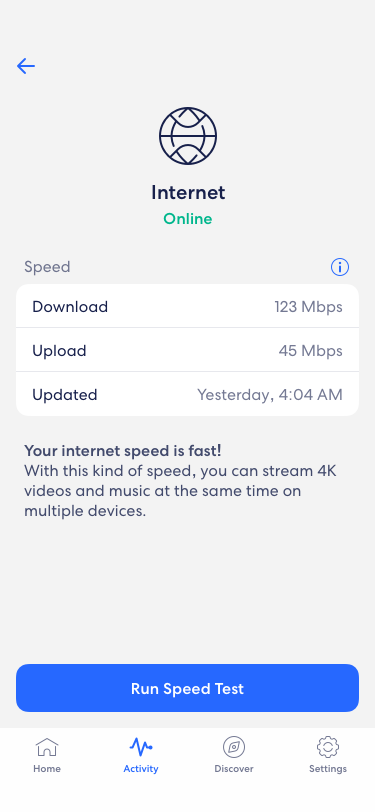
Please note that the Eero speed test measures the speed coming into your property, not the speed being received by your devices. For more accurate results on device speeds, consider other methods.
Wired Connection Speed Test
For optimal performance, we highly recommend using a wired connection (e.g., for gaming consoles, PCs, or laptops) via a CAT5e or higher cable. Please avoid using CAT5 cables, as they are not capable of supporting speeds above 100 Mbps.
Once your device is connected via the correct cable, we suggest downloading the Ookla Desktop App for either PC or Mac. Here are the steps for a more accurate result:
- Restart your laptop or PC before starting the test.
- Close any programs or apps that might be using bandwidth.
This will ensure a clearer reading of the true speed you're receiving.
Note: Not all devices are Gigabit-compatible, so speeds may vary based on the device.
Wireless Connection Speed Test
While wireless internet is the most convenient option, it is more susceptible to interference compared to a wired connection. The speed you get via Wi-Fi can also vary depending on the device you're using. Keep in mind that older devices may not support the faster speeds available.
To run a wireless speed test, we recommend downloading the Ookla app on your mobile device. Once installed, select your network and hit the GO button to run the test.
Important: Your wireless speed will fluctuate depending on factors like device type, environment, and the distance from your router.